Basic
$9.99/month
7-day free trial
- Invoices
- Packing slips
- Delivery notes
- Shipping address labels
- Your logo, business details and footer
- Print or download as PDF
- Tax lines with your own label, such as GST or VAT
 Invoice & Packing SlipOrder documents · Shopify app
happifyView Invoice & Packing Slip demo store 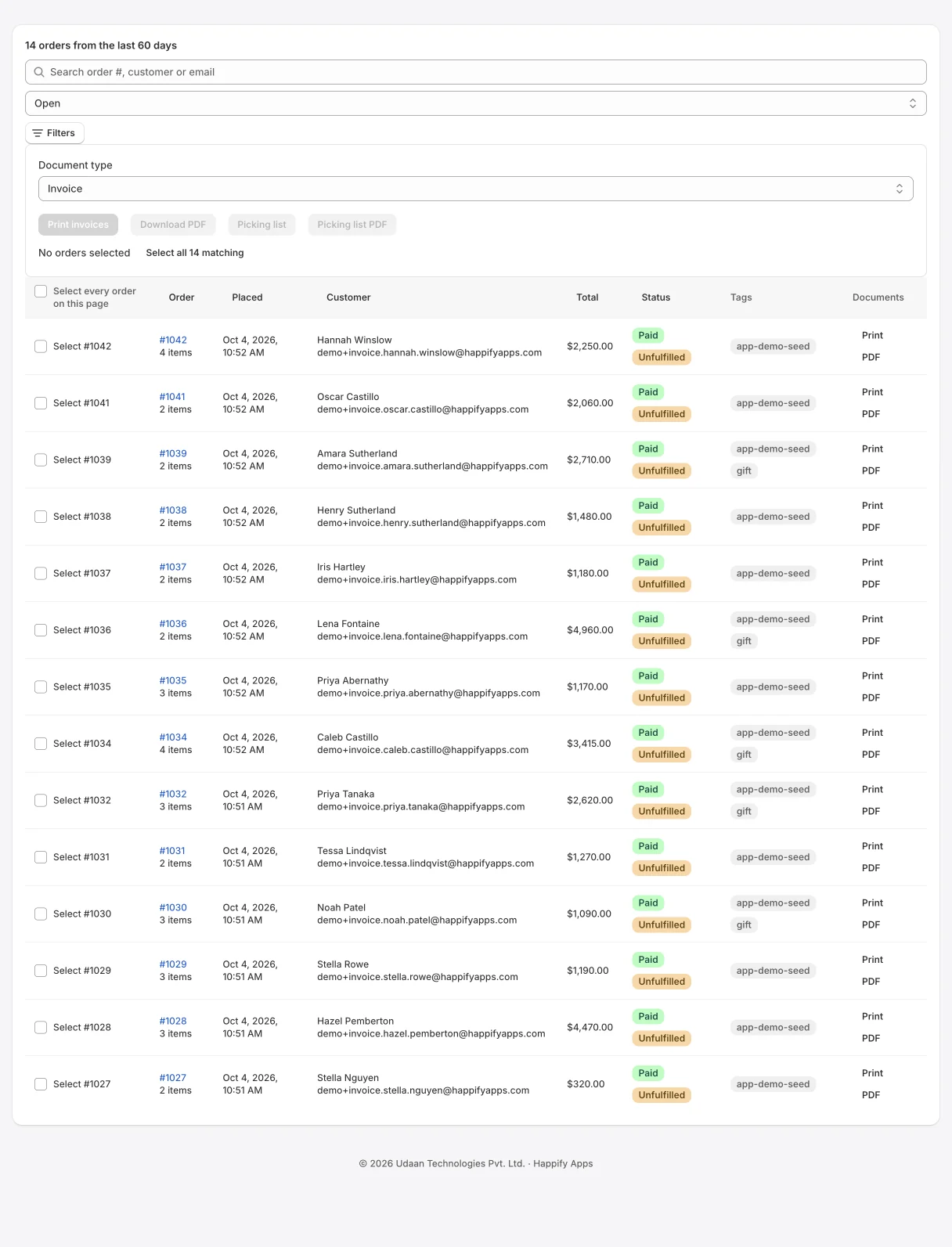
Orders with a document picker and batch print
Branded invoices, packing slips and pick lists in one click
Print branded invoices, packing slips and delivery notes for one order or a whole batch.
Everything below is in the app today. Plan labels show where a feature starts.
Enter your business name, address, tax number and label, contact details, logo and footer. A banner reminds you until they are filled in.
Filter recent orders by status, tag or search, and select one order or a whole batch.
Print invoices, packing slips, delivery notes or address labels in one print dialog, or download a PDF.
On Advanced, print an order’s invoice or packing slip from Shopify POS to a receipt printer.
A store we run with fictional products and orders, with Happify Invoice & Packing Slip installed. Open it from the top of this page; the password is happify.
Every plan starts with a 7-day free trial. Prices are in US dollars per month and billed by Shopify on your Shopify invoice.
Basic
$9.99/month
7-day free trial
Advanced
$14.99/month
7-day free trial
Pro
$29.99/month
7-day free trial
Available on the Shopify App Store with these plans and prices. Change or cancel your plan at any time from the app. Compare every feature by plan in the setup guide.
Yes. Set the tax label (for example GST or VAT) and your tax number in Settings. Tax lines appear on every plan whenever the order has tax.
No. Packing slips list items and quantities without prices, and show gift notes when the order has one.
On Advanced, select orders and print them in one browser print dialog, or print a picking list that combines quantities across the selection.
On Advanced, the template editor lets you edit each document with placeholders such as order number, items and totals, preview it and restore the default at any time. Direct PDF download always uses the standard layout; custom templates print through the browser dialog.
On Advanced, open an order in Shopify POS (11.11 or later) and choose “Print invoice or packing slip”. It prints to the paired receipt printer, laid out for 58 or 80 mm paper as set in Settings. Without a printer it falls back to the print dialog.
On Pro, turn on automatic sending in Settings and choose invoice or packing slip. The document is emailed to the order’s email address when a new order arrives.
No. The app only reads orders. Printing writes an entry to the app’s own document history.
Merchant reviews live on the app’s Shopify App Store listing. There are none for the rebuilt app yet.
HappifyApps support
CURRENT RELEASE
Released September 24, 2026. Shopify API 2026-10.
Read the changelogSETUP GUIDE
Install, permissions, first run, every screen and plan, and what happens when you uninstall.
HUMAN SUPPORT
Send your store URL and a screenshot. We reply within 2 business days.
Submit a support requestOr email admin@happifyapps.com.
Each app is installed and billed on its own, and they share one data platform.
 Happify Pick List & Low StockPick lists for unfulfilled orders with low stock alertsFrom $9.99/month
 Happify Local Delivery SheetLocal delivery sheets, driver runs and packing listsFrom $9.99/month
 Happify Delivery Rates by ZipLocal delivery rates by zip code, zone and cut-off timeFrom $9.99/month
 Happify PWA: Home Screen AppLet shoppers install your store on their home screenFrom $9.99/month
 Happify Reorder PredictionsKnow which customers are ready to reorder, and whenFrom $39/month
 Happify Dead Stock RescueFind slow-moving and dead stock and free up trapped cashFrom $29/month